
We can advise whether taking credit card payments online is your best option or whether you should consider other avenues. Call (678) 457-7939 or visit us online today at https://eis2022.wpenginepowered.com/services/ecommerce/ #EIS #ElegantImageStudios
Tired of looking at your computer for hours trying to create graphics and posts for your business’s. internet marketing? Need someone to handle your social media marketing as well as blog posts etc. so you can relax or have more time with your family? We’ve got you covered. Call (678) 457-7939 or visit us online today at www.eis2022.wpenginepowered.com #EIS #ElegantImageStudios
Social media marketing is an area which seems to divide businesses. Some companies embrace it, invest in it, and generate fabulous returns from it, whilst other businesses are pensive, scared and unwilling to get online and start competing via social. The early adopters of blog marketing, for example, are way, way ahead of their industry competitors. Trying to catch up a thought leader is a virtually impossible task, after all. But, some are still unwilling to invest in social media. There are also those companies getting online and making a hash of it, then claiming social media marketing doesn’t work for them – even though, with the right guidance, their products and services could have successfully been marketed via social media engagement. The four types of social media marketing mistakes I see most often are: * We don’t have time This type of social media marketing failure masks a bigger problem – any business not committing time and energy to marketing its products and services is asking to be taken out of business. Particularly with more companies getting involved in effective social media engagement to drive traffic, increase loyalty and increase sales. Solution – create dedicated time for consistent social media marketing, or outsource it to a trusted professional consultant. * We’re dipping our toes in This type of social media marketing failure is common: businesses doing a bit of social media engagement, the odd tweet, a sporadic blog post now and then. Then, three or four months later, they’ll exclaim in a disgruntled fashion that social media didn’t work for them. In the words of Yoda – ‘Do Or Not Do, There Is No Try ‘especially when it comes to social media marketing. Solution – invest in social media management workshops and social media training, to create effective strategies. * We’re having a go at it This type of social media marketing failure is common among small businesses and solo entrepreneurs. The hapless, untrained, uneducated DIY-ers, jumping onto social media platforms and trying to deliver successful social media engagement without any knowledge, training or professional guidance. Would you ask a trainee Doctor to ‘have a go’ at heart bypass surgery for you? Solution – same as above, invest in professional consultancy to make sure your social media marketing is achieving results. * We don’t have the budget This type of social media marketing failure is on the increase and comes from the assumption that social media engagement comes for free. Obviously, as with any other well-planned, strategic, effective marketing activity, it takes time, energy, investment, and cold, hard cash. A business not investing in social media marketing is losing customers to competitors online. Solution – allocate budget to social media marketing and start taking the online revolution seriously, before it’s too late. Article from: http://www.40billion.com/post/71687#23
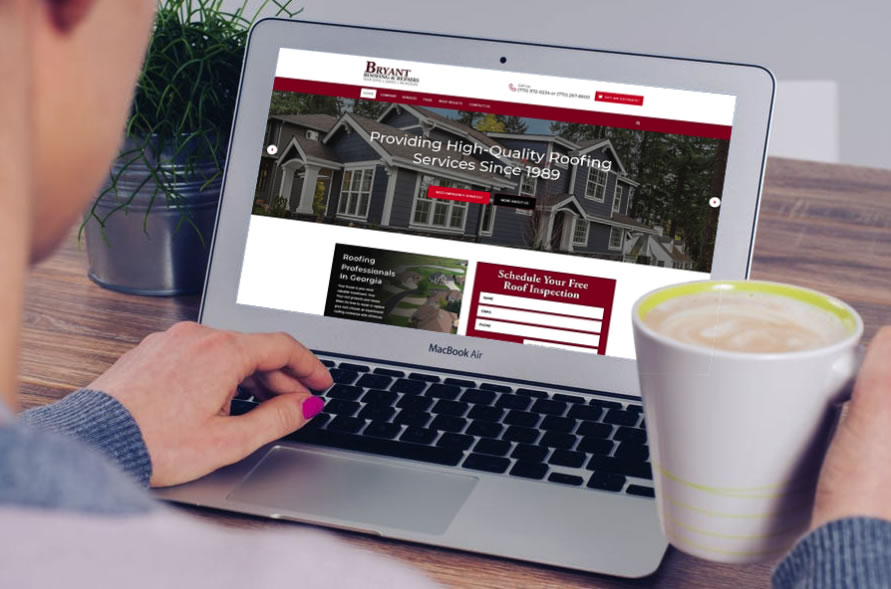
Bryant roofing & Repairs has been a valued client of ours since 2010. They decided it was time to up their website presence on the net by converting to a customized responsive WordPress website. All while keeping their current color scheme. Bryant Roofing and Repairs is the contractor you need with the experience, dedication, and know-how to properly install or repair the roof over your head. They are a family-owned and operated roofing business servicing Gwinnett, Walton, and the surrounding areas since 1989.
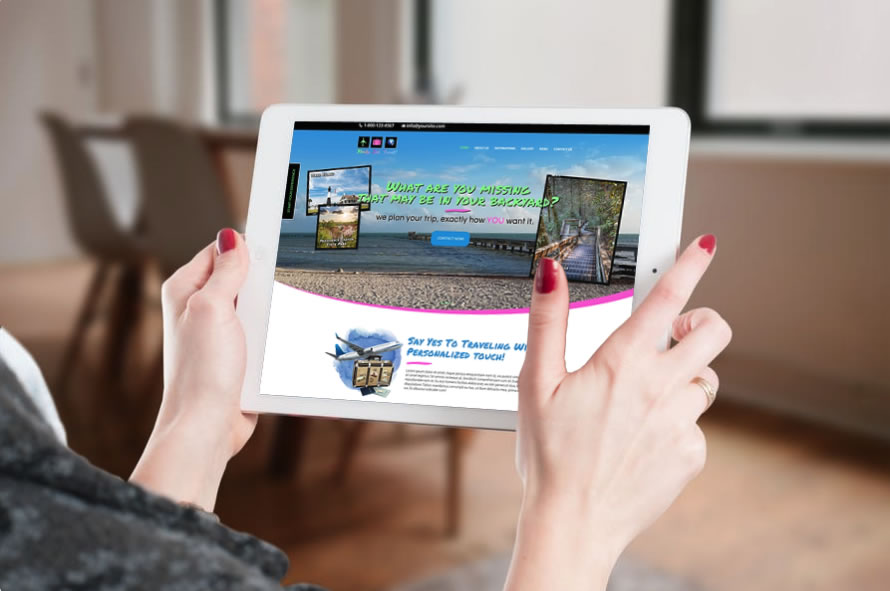
This is not your standard travel website. The owners of Ready, Set, Travel want a travel site with a personal touch. Most travel websites cause an overwhelming feeling when you visit the site and a person can spend hours just trying to decide on destinations not to mention travel dates available. Many people do not even know about some of the more local destinations that they are missing in their own backyards. So, Ready, Set, Travel was created. The owners wanted fun fonts with fun colors to match their logo. They also asked for easy navigating.
Starting in July, Google Chrome will mark all HTTP sites as “not secure,” according to a blog post published today by Chrome security product manager Emily Schechter. Chrome currently displays a neutral information icon, but starting with version 68, the browser will warn users with an extra notification in the address bar. Chrome currently marks HTTPS-encrypted sites with a green lock icon and “Secure” sign. Google has been nudging users away from unencrypted sites for years, but this is the most forceful nudge yet. Google search began down-ranking unencrypted sites in 2015, and the following year, the Chrome team instituted a similar warning for unencrypted password fields. The Chrome team said today’s announcement was mostly brought on by increased HTTPS adoption. Eighty-one of the top 100 sites on the web default to HTTPS and a strong majority of Chrome traffic is already encrypted. “Based on the awesome rate that sites have been migrating to HTTPS and the strong trajectory through this year,” Schechter said, “we think that in July the balance will be tipped enough so that we can mark all HTTP sites.” Developers have been transitioning their sites to HTTPS and making the web safer for everyone. Progress last year was incredible, and it’s continued since then: Over 68% of Chrome traffic on both Android and Windows is now protected Over 78% of Chrome traffic on both Chrome OS and Mac is now protected 81 of the top 100 sites on the web use HTTPS by default Chrome is dedicated to making it as easy as possible to set up HTTPS. Mixed content audits are now available to help developers migrate their sites to HTTPS in the latest Node CLI version of Lighthouse, an automated tool for improving web pages. The new audit in Lighthouse helps developers find which resources a site loads using HTTP, and which of those are ready to be upgraded to HTTPS simply by changing the subresource reference to the HTTPS version. Chrome’s new interface will help users understand that all HTTP sites are not secure, and continue to move the web towards a secure HTTPS web by default. HTTPS is easier and cheaper than ever before, and it unlocks both performance improvements and powerful new features that are too sensitive for HTTP. Developers, check out our set-up guides to get started.
Your website is a living, breathing entity on the internet. Every update you make to your website once it is “live” on the internet plays a part in its interaction with visitors, customers, and the powerful search engines. However, a static website without updates of any kind may be viewed by search engines as a “dead” entity – with no life and nothing new to offer. By keeping your website updated by having a blog or new projects added, it offers search engines a haven for fresh content and sources of new information for their search requests. Simply put, if you update your website often with high-quality content, search engines will love you for it. Some other reasons why it’s important for your website to be updated frequently with fresh content… Fresh Content – Frequent Indexing Don’t confuse this phrase with the thinking that fresh content will give you higher indexing. That may not be the case. However, the more frequently you update your website with articles, downloads, and new web pages, the more frequently a search engine will stop by to visit your website. When search engines look at your site more frequently, you have the opportunity to achieve higher rankings based on the content you provide. Keep in mind, more content is not the key here, quality is. So, yes, it is a good idea to update frequently, but keep your content standards high. If you blast your page with a ton of low-quality articles stuffed with keywords, you are going to be penalized. Google Loves Frequent Updates By far, the most frequently used search engine is Google. As the king of all search engines, Google has a tremendous influence on webmasters and how websites are constructed. When Google expresses its love for websites that update frequently, this is a sure sign that you should add fresh content to your website as often as you can. Of course, you should not make unnecessary changes, additions, or postings every hour of every day. However, a site that is updated once a day, or at least two to three times a week, is considered a frequently updated site. The “Googlebot” that crawls the web is constantly searching for web pages that are new or updated and then adds the fresh content to the Google index. If you update your content often with reliable and valuable information, then you have a better chance of Google ranking your site higher with each update. More Content, More Keywords When you publish new content, you present yet more opportunities for your site to contain more keywords. Keywords are high on the algorithm chart for search engine indexing and ranking. Frequently added content, such as blog or article postings, allows you to optimize the article with pertinent keywords that can attract visitors to your site. For instance, if you run an insurance quote website and update four to five times a week with new articles, you can focus each article on a different aspect of insurance, such as “automobile liability insurance” or “universal life insurance.” Each time you add a new article, you incorporate valuable keywords that help a search engine recognize your website as a place searchers can visit for their specific insurance needs. Now, you have to remember that with the algorithm updates, Google does not base a ton of weight on how many keywords your website has. Google is looking at top quality content, rather than keyword-stuffed nonsense content when it indexes a site. Fresh Content Increases Your Authority Potential All webmasters strive to become the industry “authority” in Google’s eyes. The predominant strategy to becoming an authority site is by abiding by the SEO adage, “content is king.” The more informative, valuable content you can publish that pertains to your industry, the greater authority potential your website enjoys. In addition, if you review your competitors’ websites, you will quickly find that the authority sites in your industry have tens of thousands of pages indexed by Google, who also measures relevance by site saturation. The more valuable content you publish, the better your chances of becoming an authority site. Keep Your Audience Informed and Updated Another good reason to update your website with valuable content is to keep current subscribers updated, as well as provide necessary information for new visitors to convert to customers. By keeping your audience engaged, you develop long-term loyalty, which translates into returning traffic that adds tremendous value to your website. Regularly updating your website with fresh content will not only garner appreciation and loyalty from your visitors but will put you in good standings with the powerful Google. If a visitor finds your site and begins reading through your content and finds it is outdated, do you think they will stay or go? What would you do? I certainly would not order anything from someone who had an article from 2011 on their main page. I want to know the business is active, alive, worthy. If you do not have the time to maintain a blog make sure you give us a call today to discuss our special monthly blog or our monthly blog/social media package offer we have going on right now! Don’t lose rankings by not having fresh content on your site! Call us at (678) 457-7939 today Article from https://seositecheckup.com/articles/5-reasons-why-fresh-content-is-critical-for-your-website-and-seo
Most companies today spend a good portion of time and resources marketing to consumers. There are basic strategies that nearly every good marketer uses, such as ensuring they have a solid call to action buttons and that they know their target audience. Unfortunately, a mere 22 percent of companies say they’re happy with their conversion rates. If you want to take your marketing to the next level and gain even more leads and conversions, choose key tactics to implement. The following are strategies you might not initially think about but should use as soon as you’re able to. 1. Host an Event No matter where your business is located, there’s a local event that ties into your niche. If you run an HVAC service, for example, a local garden club may need hosts for their annual garden tea party. You can play host in countless ways. Act as a sponsor, for instance, among many other sponsors, or create an entire event on your own. 2. Enhance Usability One thing that’s often overlooked by marketers is the experience the user has once they land on the target page. It takes a lot of effort to drive traffic to your site, so once you get that traffic to your landing page, make sure you engage site visitors and keep them there. If your goal is to convert site visitors into newsletter subscribers, the process to subscribe needs to be simple and intuitive. 3. Find Your USP You’ve likely heard about your unique selling proposition (USP) before, but take the time to really dig into this concept. What’s completely unique about your company or product that no one else has to offer? This idea requires studying your competition to see what their USP is and then making yours different or better. 4. Figure Out Who Your Undesirable Customers Are You’ve likely already created a user persona for your ideal customers. It’s a common tactic for marketers to study their target audience inside and out. However, figuring out who your undesirable customers are can help you as well. These are the people you never want to deal with — those who complain non-stop or cost your company a lot of money because of returns. Knowing both your desirable and undesirable customers allows you to figure out the best places to reach those you want to reach and avoid those you don’t want as customers. 5. Reach a Global Market Unless you run a local service business, you’ll benefit from global outreach. One way to expand your customer base is by reaching out to global markets. If you sell a physical product, factor in shipping or foreign warehouse and delivery costs. If you sell a digital product or service, global marketing becomes a simple matter of getting to know the customers in those markets and what they want. 6. Go Mobile You’ve heard it over and over again — mobile is the wave of the future. Seven out of every 10 media minutes is spent on mobile devices, with smartphones accounting for about half. However, just making an ad mobile-responsive is no longer enough. Businesses need to look ahead to what mobile devices will be like and embrace changes now, such as the ability to interact in-store via an app. 7. Show Your Personality Don’t be afraid to show the quirky side of your business. The exception might be if you are in a very serious industry, such as finance or funeral services. Otherwise, let your goofy sense of humor show, and allow people to see what is unique not only about your company but also about its owners. 8. Choose Your Favorite Clients Is there a celebrity or local star you feel would be a perfect match for your product? Don’t be afraid to reach out to that person and offer some free samples. You may just get a shout-out in exchange and a loyal fan who will tell their very large following about what you have to offer. Ideally, these people will be influencers online or on the radio. 9. Start a Column Develop a loyal fan base by writing a column related to your business. If you sell golf clubs, start a column offering tips on everything to do with golf clubs — how to choose the right club, improving grip and so on. Next, find a site that will publish your column in exchange for a bio, and link back to your website (or find several). Alternatively, you can simply start a blog on your website and share the posts to social media. Try New Marketing Strategies You can get the word out about your business in several ways. When you see something clever, figure out the best way to repeat a similar strategy for your own business. Add new methods to your repertoire until you find the perfect mix of marketing tactics. With a lot of creativity and a little perseverance, you’ll create a successful marketing campaign in no time. Article from: https://www.websitemagazine.com/blog/9-key-marketing-strategies-you-may-have-neglected
Cross-Promote to Build Your Audience Email marketing and social media have a symbiotic relationship. When marketers incorporate links to social media in their email campaigns, they can help increase follower count and engagement across social platforms. Similarly, tweeting or posting links to email sign-up forms can help build mailing lists. It’s become a standard practice for brands to incorporate share icons for Facebook, Twitter, Instagram and LinkedIn into their email headers and footers. These make it easy for audiences to share links to articles or follow a brand on social media with a simple click. More creative ways of integrating the two forms of communication include uploading email subscriber lists to Facebook and Twitter, or creating sign-up forms within social media sites to collect email addresses directly from social media pages. Another fun way to encourage customers to follow brands’ social media pages is to offer an incentive — for example, creating a private, password-protected Facebook or LinkedIn group for “top tier” members. Each channel can, and should, serve as a referral source directing existing consumers to additional channels for continued engagement. Back to Basics: Use Social Media to Catch Users’ Attention and Reach New Audiences Consumer attention spans are shorter than ever before, and marketers should always look for new ways to stay relevant in today’s cluttered, fast-paced and oversaturated market. Personalizing email lists through segmentation based on demographics or location is one great way to catch customers’ attention. Marketers can also use snappy social media posts to capture the interests of those not subscribed to their brand’s mailing list, whether it’s through interactive Snapchat filters, witty Tweets or Instagram giveaways. The key benefits to marketers using social media are expanded reach and heightened brand awareness. Every demographic has different preferred ways of interact- ing with their favorite brands. A survey by Campaigner found that 44 percent of millennials still prefer receiv- ing information about brands through email. However, there’s no denying that social media has a large presence in consumers’ minds. By using social media platforms to extend email marketing reach, marketers have a better chance of connecting with prospects more often. Find the Right Fit: Use Platforms That Best Match Brands’ Content Using the right platforms for a brand can help skyrocket the effectiveness of a marketing campaign. Companies with more visual products will benefit most from taking advantage of Pinterest’s layout. For example, florist shops can use the platform to showcase displays of the day, and photographers can use Tumblr or other visual blogs to present their portfolios. On the other hand, airlines or other customer service-focused businesses can capitalize on Twitter for sharing rapid-fire responses or updates on delayed flights. Leverage each platform’s strengths to drive home messaging points your brand wants to get across. Remember that email allows for bigger pieces of content to be delivered to a user’s inbox, while social media can be used for sharing smaller, bite-sized snippets in the form of teaser pages, links to articles or sneak peaks. Set Realistic Expectations: Remember that Success Doesn’t Happen Overnight One hurdle marketers face when integrating social media is setting expectations too high or too low. Some view it as a tool that will dramatically increase revenue, while others fail to see the value in adding it to their marketing strategy. The real answer lies somewhere in between. Social media programs need time to be cultivated and exist as part of an overall marketing strategy, but to succeed expectations must be set correctly and efforts must be applied based on those outlooks. Don’t underestimate the power of integrating social and leveraging different platforms for different content, and remember to keep brand consistency in mind. Think of social media and email marketing as two different — but complementary — tools to use, as opposed to two siloed channels. By using a variety of social media platforms that align with the brand, marketers can expand their brand’s reach to new audiences and stay connected with loyal existing customers as well. Keep these tips in mind to create a stronger and more effective marketing strategy. Article from: https://www.websitemagazine.com/blog/integrate-social-media-into-email-campaigns

We’ve all heard the old cliche – less is more. But, is it really true? When it comes to web design, the answer is yes. Simple website design offers benefits that more complex websites can’t match. While you may like the look of elaborate designs, when designing for function simplicity will win out every time. Digital marketing expert Neil Patel points out: Far too often I see websites try to jam too much information into a very small space. The navigation is confusing, and it’s overwhelming for anyone viewing the site. If this is starting to sound like the layout of your website, it could be the reason why your conversion rates are unsatisfactory. Even if you don’t think your design is too cluttered, there’s always room for improvement. Taking the time to streamline your website will create a better user experience and serve your business better. Here are 5 important benefits of simple website designs: Simple websites convert better. Simple web designs load faster. Simple designs are more mobile-friendly. Simple websites cost less. Simple websites reduce user friction. Let’s take a look at each of these benefits to see how you can make it work on your business website. Simple Websites Convert Better. The website landing page is a specific type of webpage whose entire purpose is to convert. The golden rule of designing a landing page that converts well? Keep it simple. Simple design makes it easy to draw the viewer’s eye to the most important area of the page – and, if you’re looking for conversions, that’s your call to action. Navigating a cluttered interface is no fun. It can be confusing, overwhelming and frustrating. And, it makes it harder for users to find and complete a call to action. Here are two easy ways to simplify your web design to improve conversions… Limit Your Menu Options It can be tempting to show your audience everything you have to offer right off the bat. But, that may not be the best choice. You want your website to be informative and user-friendly. But, offering too many navigation options is more likely to overwhelm your viewers than it is to help them. You’ll see conversions increase if you limit your menu options to just the essentials. A menu full of intriguing destinations on your website many entice viewers to click in deeper before they have a chance to act on the call to action right in front of them. Conversely, users may be paralyzed by a wealth of menu options and subsequently click away entirely if they don’t see what they want right away. The more menu options are present (and the more information your viewers have to sift through), the more decisions they have to make. And, decision fatigue is a real threat to your conversions. Psychologist Barry Schwartz, the author of The Paradox of Choice, points out: The more options we have, the less likely we are to make a choice because we’re paralyzed [with indecision]; or, if we overcome paralysis and make a choice, we tend to be less satisfied with our choice later. The bar [for obtaining satisfaction] rises with the more options people have to choose from. Make life easier for your audience by giving them as few navigation decisions to make as possible. And make sure the decisions they do have to make really count. Focus Attention on Your Call to Action The more opportunities you provide on your website to buy something, sign up for emails, or subscribe to your blog, the better… Right? Wrong. Pulling your viewer’s focus in too many directions at once will decrease the likelihood that they will actually act on any of those opportunities. (Decision fatigue – remember?) Simplify your web page and increase your conversions by eliminating anything that may draw focus from your call to action. In fact, go one step further, by using the design elements to guide the eye directly to the CTA. If you’re aiming for strong conversions, make your call to action the primary focus of your webpage. You should, of course, feel free to promote multiple offers on your website. But, limit each offer to its own page so that it can get the attention it truly deserves. Simple Website Designs Load Faster. Website load speeds are vitally important to the user experience; and, as a result, to your business. Did you know that viewers start abandoning your website after mere seconds of load time? Between seconds 4 and 5 of your website’s load time, 20% of viewers have already left your site. The number only increases from there. And, not only that, search engines take your website’s load time into consideration when calculating your ranking. A faster load time means a higher placement in the search engine results. If you want to optimize your website for speed – which you should – complex web designs are the enemy. So, pare back complex graphics. Simplify elaborate layouts. Minimize your photos and graphics to speed up load times. Trim your copy and compress your video files. Faster load times keep viewers around longer, create a better user experience, and increase the likelihood that viewers will even find your website in the first place. Simple Designs Are More Mobile-Friendly. As of 2017, 63% of all web traffic took place on mobile devices. This means that how your website looks on mobile is just as important – if not more so – than how it looks on a laptop or desktop computer. Simple web design is easier to translate into a small mobile screen than a busy, visually complex design. This may be one of the most compelling benefits of simple design – with so much web traffic via mobile, creating ease-of-use for mobile users is a no-brainer. Sure, you could maintain two websites – one for desktop and one for mobile. But, that requires twice as much work. It’s far better to have one simple responsive design that can easily transition from laptop to phone to tablet while maintaining the design’s integrity. With fewer moving pieces to juggle, simple websites with limited design elements are just naturally more flexible.
